Gallery
See what others have created
unpublishedhanging
@unpublishedhanging
Chat Detail
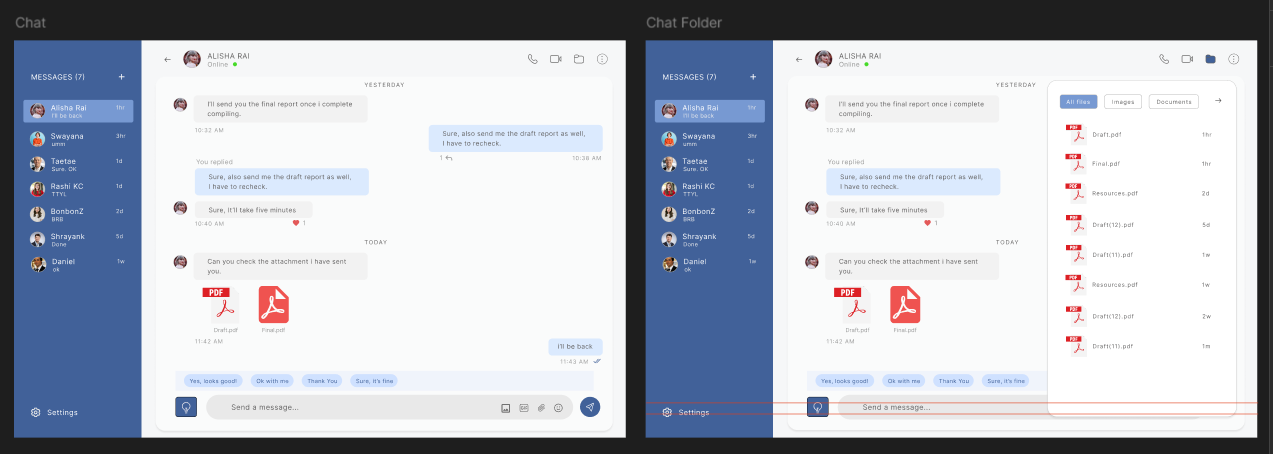
Design a single chat detail screen for a 1:1 conversation. This is the view users land on when they open one thread, so the header, message timeline, and composer need clear hierarchy. The screen should feel personal and active, not like a generic inbox.
Use a header that shows the other person’s avatar, display name, and current presence or last seen state. Keep navigation and thread actions visible but secondary. The message area should handle alternating sent and received bubbles, with timestamps, read receipts, and a clear visual distinction between user messages and incoming messages.
Include message-level interactions that fit the context: reactions, reply, copy, and delete or more actions. Add at least one in-thread state such as a typing indicator, unread marker, or date divider so the layout shows how the conversation behaves over time. The composer should support text entry plus common attachments or emoji without crowding the main thread.
What to deliver
- Design the conversation header with avatar, name, presence, and back/action controls.
- Lay out the message thread with distinct sent/received bubbles, timestamps, and read status.
- Include composer actions for text entry, attachments, emoji, and send.
- Add inline reactions and a long-press/overflow menu for message actions.
- Show at least one system state such as typing, unread divider, or date separator.
Incorporate subtle animations, like the chat bubble's entrance or a 'typing' indicator, to bring the chat to life.