Gallery
See what others have created
hipghost
@hipghost
Commenting & Replying
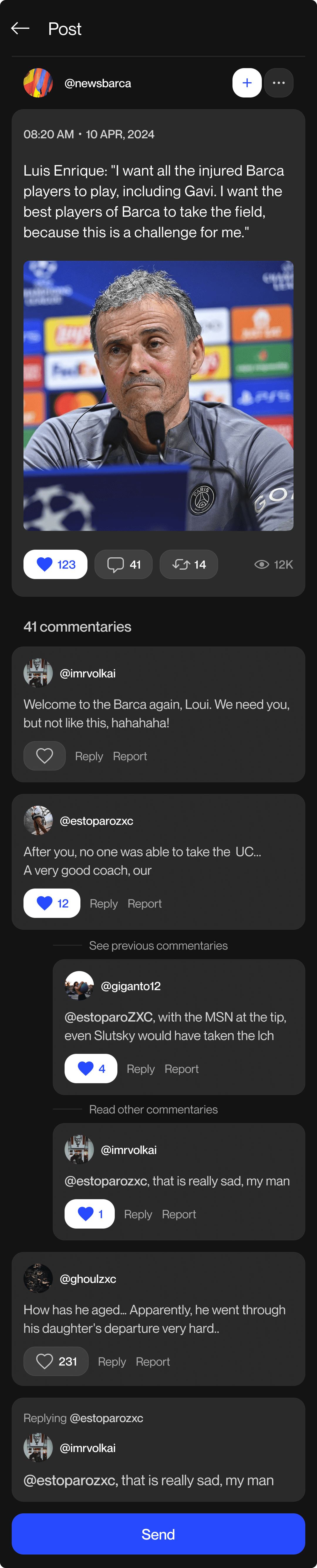
Design the comments area for a social post, including the default comment list and the inline composer used to add a new comment. Treat this as a focused flow, not a full feed mockup: the post content can be partial, but the comment area needs to feel complete and usable.
Show how replies attach to a parent comment. Use indentation, connector lines, or another clear visual cue so the thread structure is easy to scan. Keep nesting shallow and readable; if a thread gets long, show a collapsed preview with a count of hidden replies and a way to expand them.
Each comment should expose the basic actions a user expects: reply, like/react, and a more menu for moderation or deletion. When the user taps Reply, the composer should shift context to that comment and make the target obvious before the message is sent. Include a posted state that confirms the comment or reply was added and keeps the user near the thread they just updated.
What to deliver
- Design the post comments panel and the inline reply composer.
- Show threaded comment hierarchy with one clear level of nesting.
- Include reply, like, and more-actions controls on each comment.
- Design empty, loading, and posted states for the comment list.
- Show how the composer changes when replying to a specific comment.
Enliven your comment and reply flow with micro-interactions, such as subtle animations when comments are posted or replies are expanded, to enhance user engagement.