Gallery
See what others have created
felixdesbiens
@felixdesbiens
Drone Control Interface
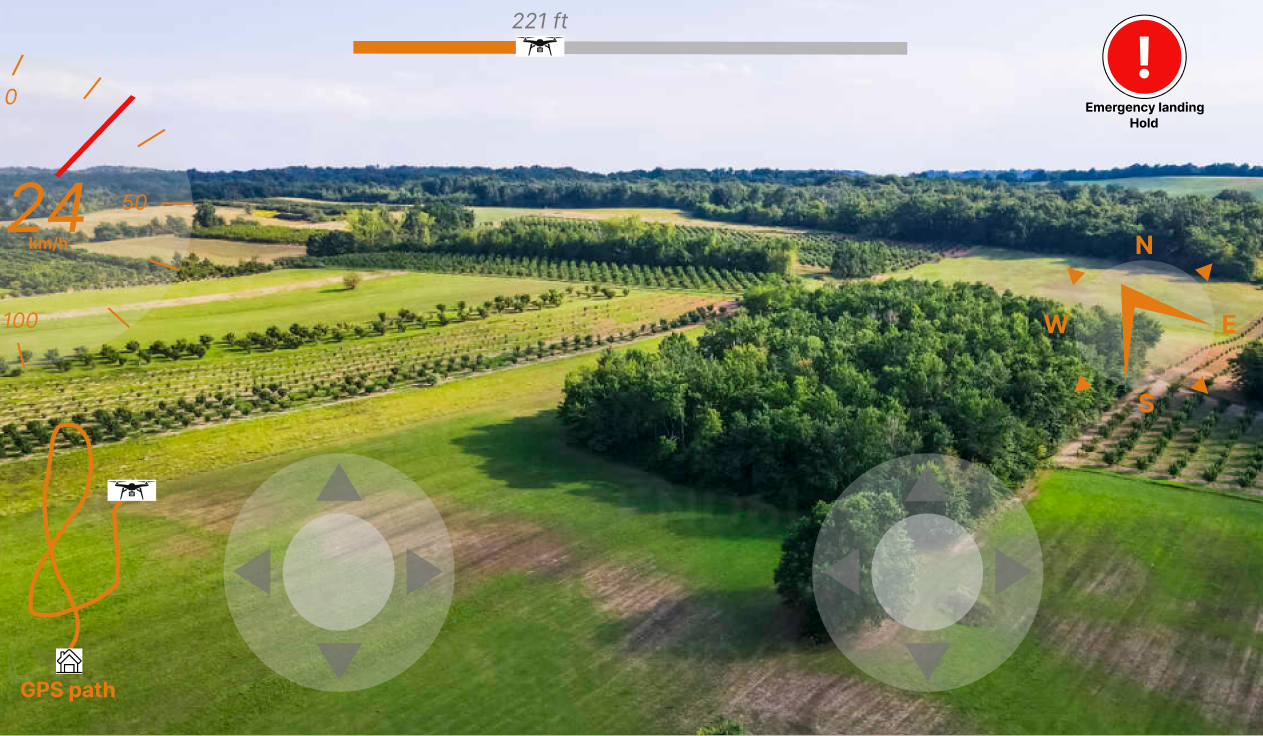
Design the main drone flight screen as a live control surface, not a generic dashboard. The pilot should see the camera feed first, with flight telemetry layered around it: altitude, speed, distance, battery, signal, and GPS status. Keep the map visible but secondary, so it supports orientation without competing with the video.
Build the control model around three moments: preflight, active flight, and landing. Preflight should confirm connection, calibration, satellite lock, and takeoff readiness. Active flight should prioritize movement controls, camera tilt, and quick access to return-to-home, pause, and emergency stop. Landing should switch the interface into a calmer state with reduced controls and clear confirmation before touchdown.
Design for both touch and precision use. A beginner mode can surface larger controls and guidance, while an expert mode can condense the UI without changing where core actions live. The layout should make it obvious what the drone is doing right now, what the pilot can change, and what happens if battery, signal, or obstacle warnings appear.
What to deliver
- Design the live flight screen with video, map, altitude, speed, battery, and signal strength.
- Place primary flight controls within thumb reach and keep secondary actions tucked away.
- Add a clear takeoff/land flow with preflight checks and armed/flying/landing states.
- Include an obvious emergency stop or return-to-home action.
- Show alerts for low battery, weak signal, obstacle detection, and GPS loss.
Incorporate intuitive icons and gestures to minimize the learning curve for new users.