Gallery
See what others have created
unquestionedskull
@unquestionedskull
Logging In
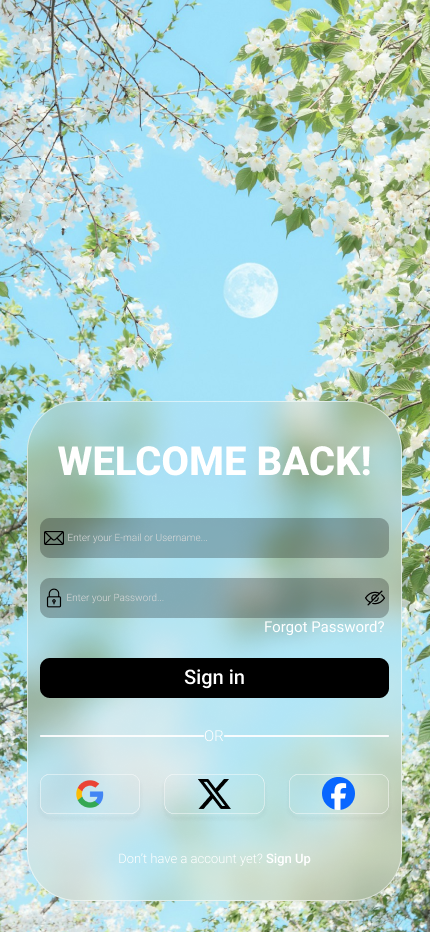
Design the full sign-in flow for a product, not just a static form. Start with the login screen: brand, email or username field, password field, and one clear primary action. Keep the layout simple and familiar so the user can scan it fast and move on without hunting for controls.
Show the states that make login usable in real life: password reveal, inline validation, disabled submit until the form is ready, loading after submit, and an error state for wrong credentials. Errors should sit next to the problem field and keep the user’s input visible. If the product supports it, include a secondary path for SSO or magic link sign-in, but do not let it compete with the main login method.
Add the recovery path from the login screen. Forgotten password should open a clear reset flow with a short explanation, a place to enter email, and a confirmation state that tells the user what happens next. If the user is signed out because of timeout or device change, the screen should explain why and preserve context so they know how to get back in.
What to deliver
- Design the sign-in screen with email/username, password, and primary submit action.
- Include password visibility toggle, remember-me option, and forgot-password link.
- Show loading, success, and invalid-credentials states.
- Design account recovery entry from the login screen.
- Include an optional SSO or alternate sign-in path if the product supports it.
To delight users, try incorporating subtle animations or micro-interactions as they move through the login flow, such as gentle fades, input field highlights, or a cheerful animation upon successful login.