Gallery
See what others have created
sangmin
@sangmin
Product Detail
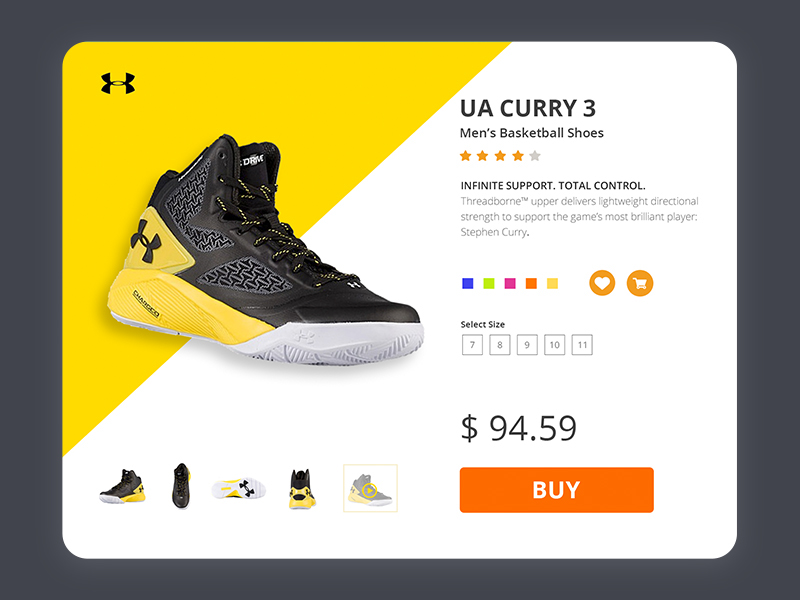
Design a product detail page for a single item that helps a shopper decide fast. The page should make the product identity, price, and purchase status clear before they scroll. Use a strong visual hierarchy: gallery first, then title, rating, price, and the main buy action.
Include the interactions people expect on a real product page: image thumbnails or a carousel, zoom or full-screen view, variant selectors, quantity control, and secondary actions like wishlist or compare. Selected states should be obvious, and unavailable options should read as unavailable instead of looking broken.
Place the details that affect purchase confidence close to the action area: shipping estimate, return policy, stock level, and any promo or installment info. Keep specs, description, and reviews organized below the fold so the page feels detailed without feeling cluttered.
The screen should feel shoppable, not editorial. A user should know what they’re buying, what it costs, what changes the price, and what happens after they tap buy.
What to deliver
- Design a product detail page with image gallery, title, price, rating, and key purchase info.
- Place the primary purchase action above the fold with secondary actions nearby.
- Show variant selection for size, color, or configuration without hiding current state.
- Include shipping, returns, and stock details where purchase hesitation happens.
- Add a compact section for specs, description, and reviews.
Emphasize the visual hierarchy to guide users' attention to the most important details first.