Gallery
See what others have created
sheeshable
@sheeshable
Button Mapping Screen
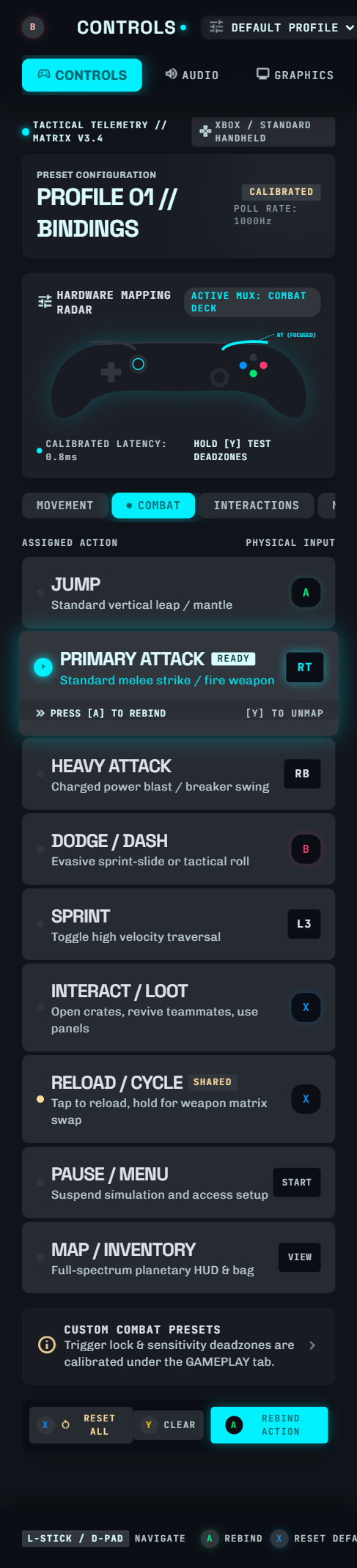
Design the controller button mapping screen for a game’s settings menu. The player should be able to see current bindings for each action and change them without losing track of what is selected.
This lives in a game menu, so the layout should feel usable with a controller first: focus states, directional movement, and clear feedback for the currently active binding matter more than mouse-like precision.
The screen should support remapping common actions like jump, attack, pause, and menu navigation. Keep the relationship between action and assigned button obvious, even when several actions use the same input.
The interesting part is the swap between browsing and remapping. The UI needs to make it clear when a binding is waiting for input, when a new button has been captured, and when a choice conflicts with an existing mapping.
What to deliver
- Design the full button mapping list with actions and current controller inputs.
- Design the remap capture state for choosing a new button.
- Design conflict feedback when a button is already assigned elsewhere.
- Design reset-to-default and cancel controls.
- Design focus and selection states for controller navigation.
Use a distinct capture state that temporarily dims the list and highlights only the action being edited, so the player knows the next button press will replace that binding.