Gallery
See what others have created
jooeun
@jooeun
Mini Control Center Tile
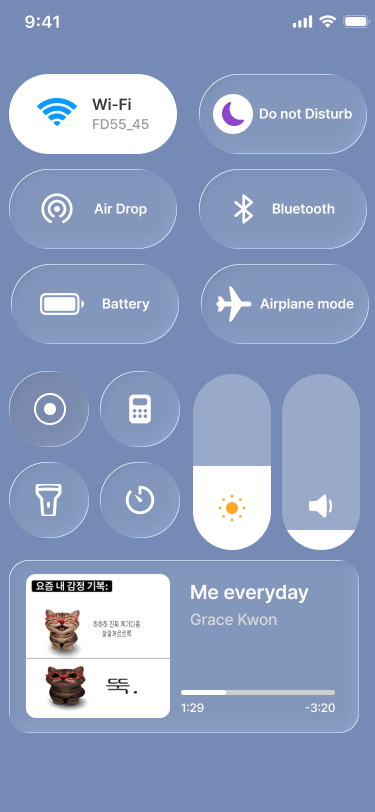
Design a single Control Center tile in its default state, shown inside a grid with other system tiles. It should feel like part of the phone’s native control surface, not an app card.
The tile has an icon and a short label. It needs to read clearly at a small size, with enough visual weight to stand out among neighboring controls without looking oversized.
Treat the grid context as part of the design. The tile must sit naturally beside other tiles, with spacing, alignment, and hierarchy that match a system panel on mobile.
Think about what makes a tiny control recognizable at a glance: shape, contrast, and label treatment. The tile should be instantly scannable even when the panel is dense.
What to deliver
- Design the tile’s default visual state
- Show the icon and label treatment at small size
- Place the tile in a representative grid with neighboring tiles
- Define spacing, padding, and tap target boundaries
- Include the inactive look that matches the system panel
Design for a quick thumb scan: the icon should carry the meaning first, with the label acting as backup when the tile is already in peripheral view.