Gallery
See what others have created
sheeshable
@sheeshable
Augmented Reality Scanner
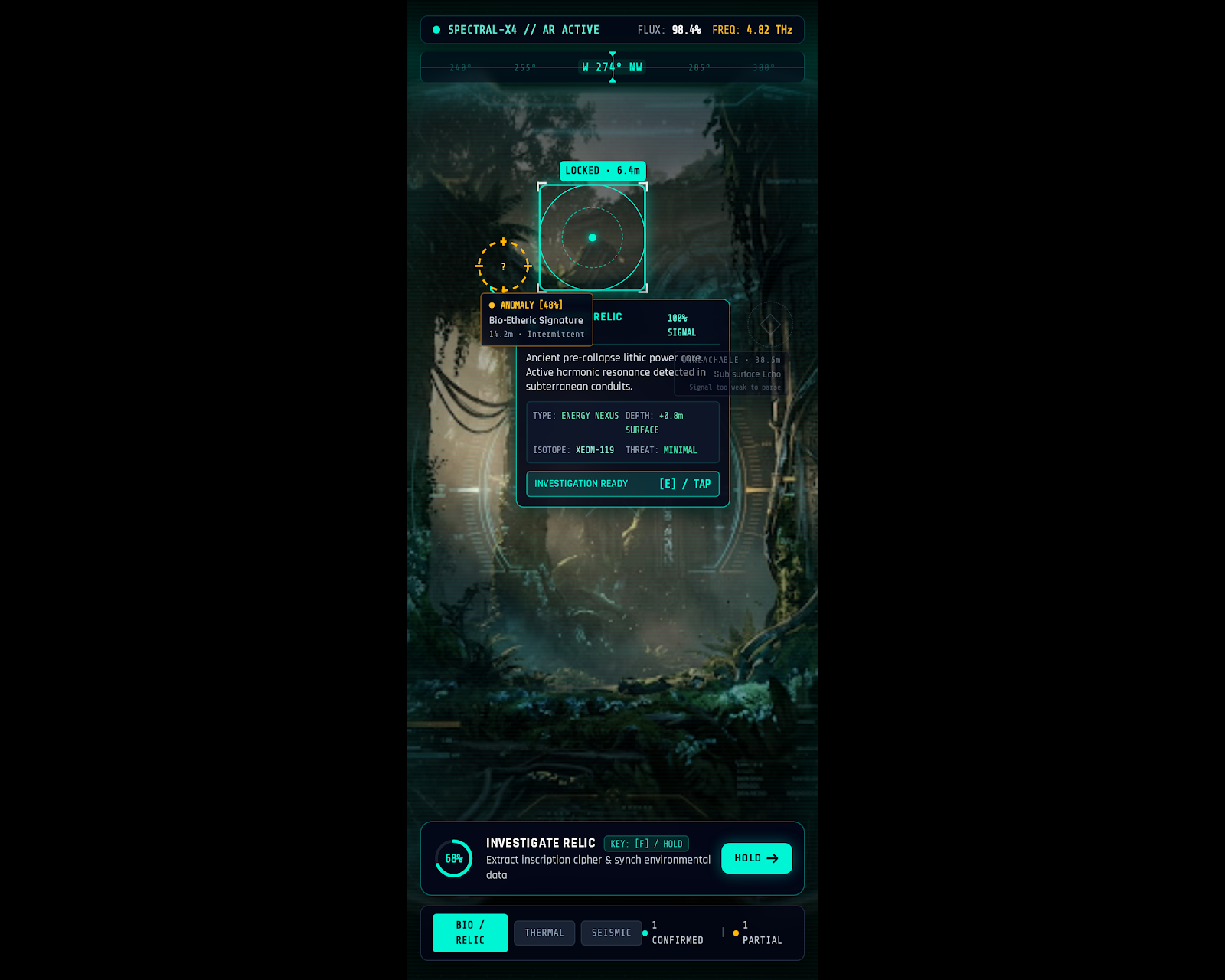
Design the default augmented reality scanner overlay for a game-world exploration moment. The player is looking through a device or visor at a live scene, and the UI reveals hidden objects, clues, or interactable traces layered on top of the environment.
The overlay should feel like part of the world, not a menu pasted on top. It needs to frame what the scanner is doing, what it has found, and what is worth following next, while leaving the scene readable underneath.
Focus on how hidden items are surfaced: outlines, labels, signal strength, range, or scan noise can all help, but the player still has to understand what is real, what is partial, and what is only a lead.
This is a hard challenge because the screen has to carry discovery, feedback, and navigation at once. The best version makes the scan result legible in motion, with enough hierarchy that the player can act without losing the sense of being inside the world.
What to deliver
- Design the scanner HUD overlay in its default active state.
- Show at least three hidden-object treatments: confirmed, partial, and out-of-range.
- Place scan controls and status readouts without covering the main target area.
- Design the moment a clue is highlighted from the environment.
- Include a compact prompt for how the player investigates or collects a find.
Use one visual language for certainty and another for suspicion: for example, solid treatment for confirmed finds and fragmented or pulsing treatment for nearby clues.