Gallery
See what others have created
haddie
@haddie
OTP Code Entry Screen
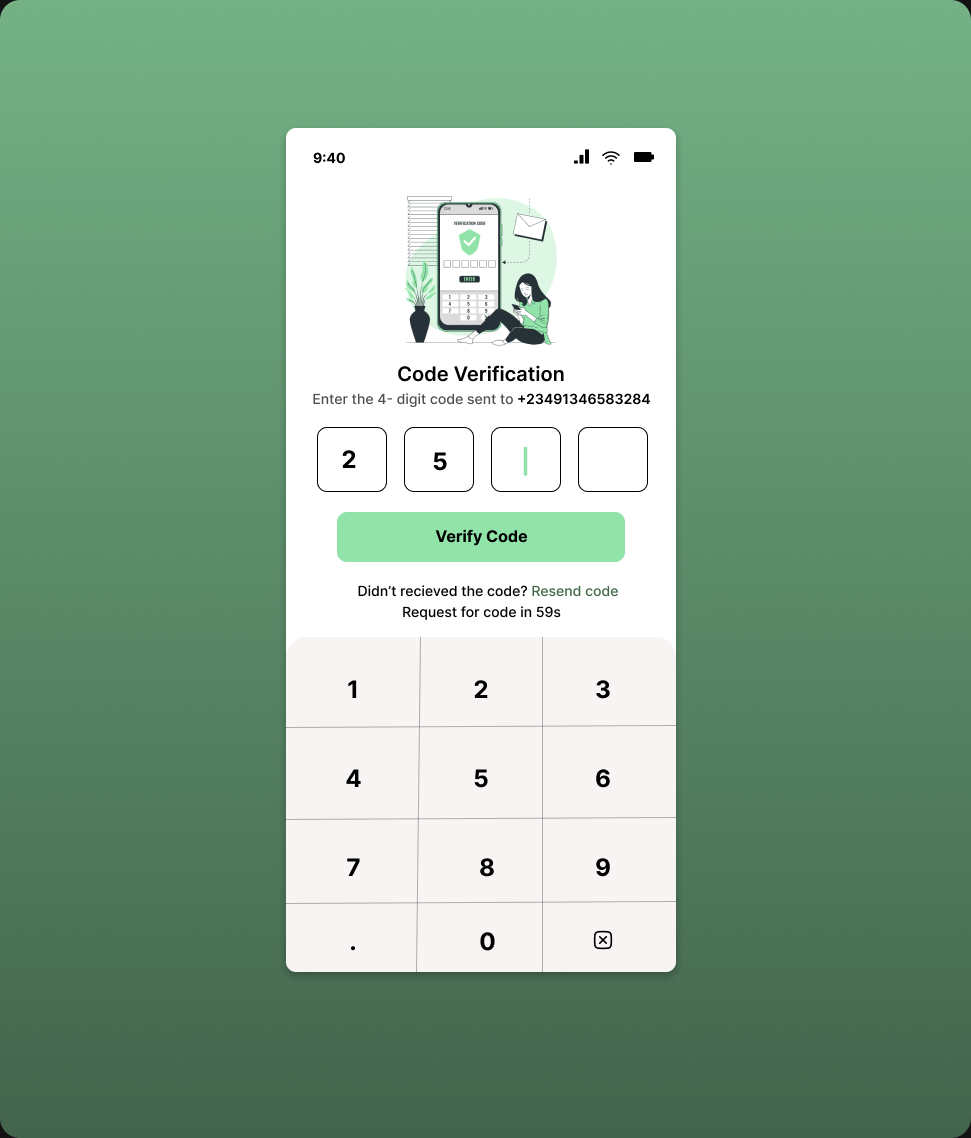
Design a mobile OTP entry screen for a numeric one-time password flow. The layout uses separate boxes for each digit, with the code entered one digit at a time.
The screen lives in a verification step, so the user should immediately understand where the code goes, how many digits are needed, and what happens as they type. Keep the focus on the code field and the keypad.
The on-screen numeric keyboard is part of the experience, not an afterthought. It should feel native to mobile input, with clear digit keys and a simple way to correct mistakes.
Make the input state easy to read while the code is incomplete: active box, filled boxes, and any masked or visible digit treatment should all be obvious without extra explanation.
What to deliver
- Design the OTP screen in its default empty state.
- Show the focused digit box and the filled-digit progression across the row.
- Include the numeric keypad with a clear delete/backspace key.
- Add the resend-code affordance in a secondary position.
- Define the visual treatment for invalid or expired code entry.
Design the digit boxes so the caret/focus state and the filled state are distinct even when the keyboard is open and the user is entering quickly.