Gallery
See what others have created
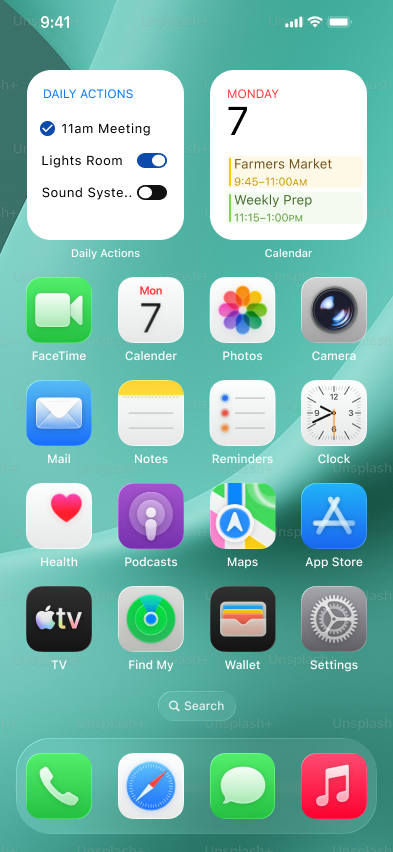
considerable_motorcar
@considerable_motorcar
Interactive Home-Screen Widget
Design a home-screen widget for a mobile app that lets people act on the data already on their device. Taps should complete the action in place: check off a task, toggle a device, or trigger the widget’s core control without opening the app.
The widget lives among other home-screen icons and widgets, so it needs to read instantly in a small space. The content should make the current state obvious before touch: what is on, what is done, what is available, and what changed after a tap.
Treat the widget as a compact control surface, not a preview card. It should show the minimum information needed to trust the action, while still making the target large enough for a thumb and the result clear enough to confirm at a glance.
Design the default state and the immediate post-tap feedback. The interaction should feel native to the home screen, with the widget staying useful even when the app is not open or foregrounded.
What to deliver
- Design the widget in its default home-screen state.
- Show at least one tappable control state and its completed state.
- Show how the widget communicates a successful action without opening the app.
- Include the smallest readable version of the widget if the layout scales.
- Define the tap target and any status text or icon treatment inside the widget.
Use a strong visual difference between states that can be acted on and states that are already complete; don’t rely on text alone to explain what a tap will do.