Gallery
See what others have created

serank2502
@serank2502
Pull-to-Refresh Feed
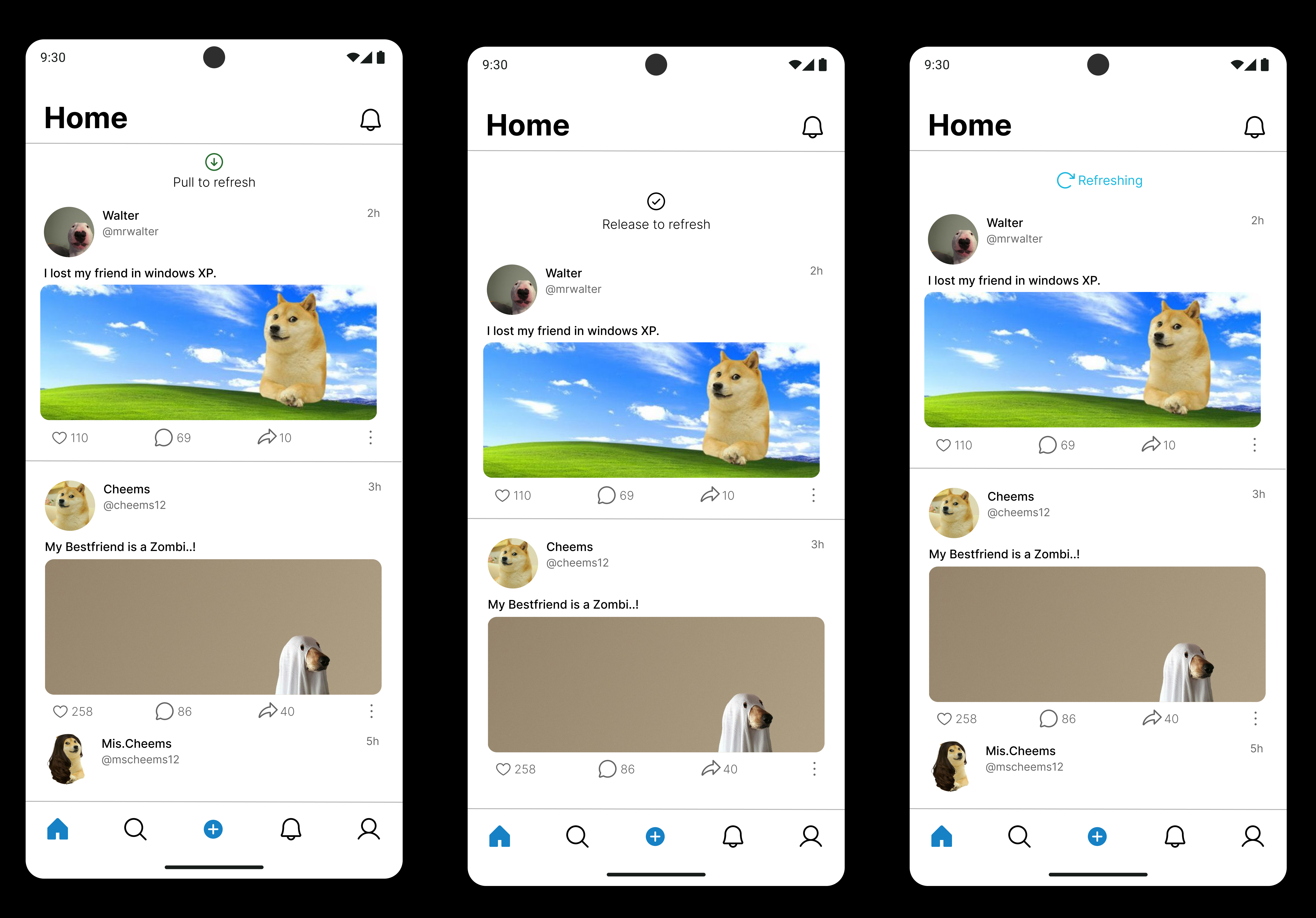
Design a mobile feed or list screen with pull-to-refresh as the main gesture. The view should feel like a real content feed, not a demo panel: items continue under the top edge, and the refresh interaction starts from that scroll position.
Show the moment the user drags down from the top and the refresh indicator appears. Make the motion feel native to mobile, with the content stretching or shifting just enough to signal that a refresh is being pulled in.
The indicator should clearly communicate progress: idle, pulling, armed, and refreshing. If the user pulls far enough, the state should flip from hint to action without needing extra explanation.
Keep the feed context visible during refresh so the user knows what is being updated. The design should make it easy to tell whether new items arrived, the list stayed the same, or the refresh is still in progress.
What to deliver
- Design the feed in its resting state at the top of the list
- Design the pull-down interaction with the refresh indicator partially revealed
- Design the armed state when the pull threshold is reached
- Design the active refreshing state while the list is held in place
- Design the post-refresh state showing updated content in place
Use the topmost content item as the anchor for the gesture; if that item slips too far out of view, the pull feels disconnected from the feed.