Gallery
See what others have created
haddie
@haddie
Tutorial Overlay Highlight
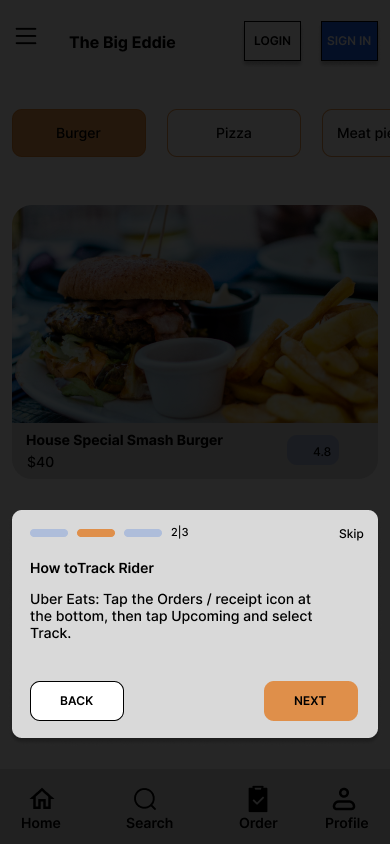
Design an in-app tutorial overlay for mobile that dims the current screen and spotlights specific UI areas one at a time. The overlay should teach by pointing at real controls already on the page, not by replacing the app with a separate lesson screen.
Each step needs a clear focus region, a short callout, and a way to move forward or skip. The mask, highlight shape, and callout placement should work across different target areas: top bars, bottom nav, cards, buttons, and gestures.
This lives on top of the live app state, so the underlying screen still matters. The overlay should feel anchored to the product, with callouts that adapt when the highlighted element sits near edges, in a scrollable area, or close to the keyboard.
The challenge is making the guidance feel interactive without turning the screen into clutter. The tutorial should help first-time users notice what to tap next while keeping the rest of the interface legible enough to understand the context.
What to deliver
- Design the dimmed overlay state with one spotlighted UI target.
- Design the callout card for a single tutorial step.
- Design next, back, and skip controls for the overlay.
- Design at least one placement variation for a target near the top or bottom edge.
- Design the transition between tutorial steps as the highlight shifts to a new control.
Use the highlight shape and callout tail as a single system: if the target moves or sits near an edge, the callout should reflow instead of covering the focus area.