Gallery
See what others have created
inescapable_doorstep
@inescapable_doorstep
Map Search Autocomplete
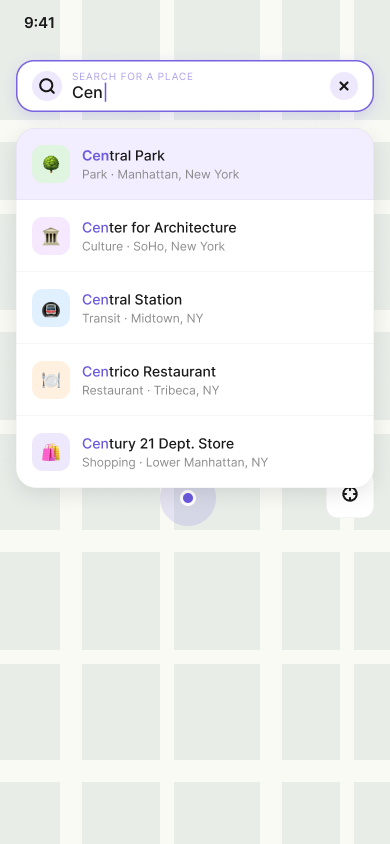
Design the map search field and its autocomplete dropdown on mobile. The user is on a map screen and starts typing a place name; suggestions appear under the field as they enter text.
This is not a full search page. The map stays visible behind the overlay, so the search UI has to sit cleanly on top without hiding the user’s location context or nearby controls.
Show how the suggestion list behaves as the query changes: matching place names, secondary location details, and a clear path from typing to choosing a result.
The interaction should feel fast and spatial. The user needs to understand that selecting a suggestion will move the map, not just fill the field.
What to deliver
- Design the map search bar in its active typing state.
- Design the autocomplete dropdown with 4–6 location suggestions.
- Show selected text and how a suggestion row is highlighted on touch.
- Include a clear control to dismiss or clear the search.
- Show the map context visible behind the search overlay.
Use one-line primary labels with smaller secondary text for city, region, or landmark type so the list stays scannable at thumb distance.