Gallery
See what others have created
sheeshable
@sheeshable
Media Editor
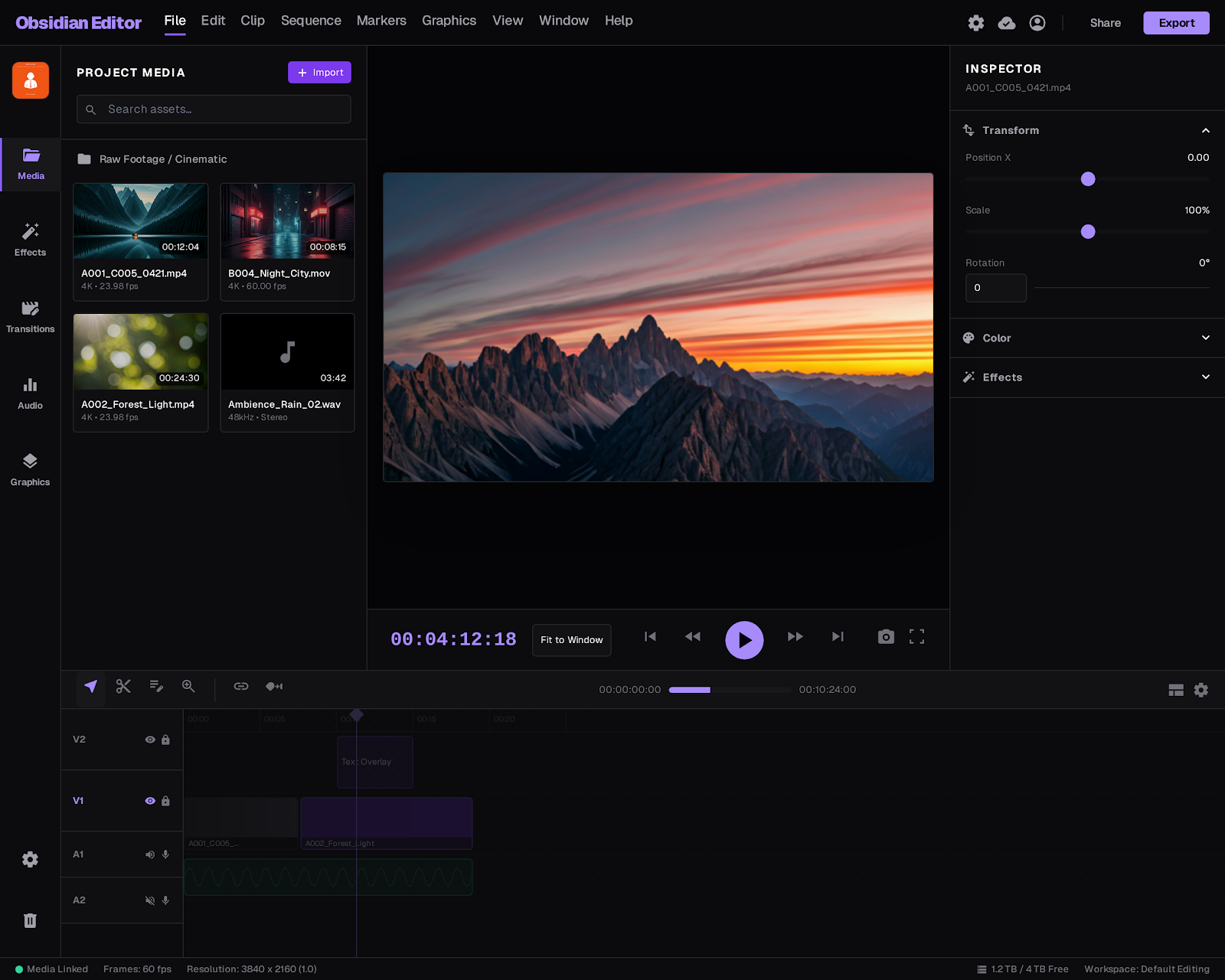
Design the main Media Editor workspace for a desktop editing app. Focus on the everyday editing surface: a large preview area, a timeline with multiple tracks, and a side panel for media and clip tools. The screen should feel like a place to assemble and refine a project, not a catalog of features.
Make the primary editing flow explicit. Users should be able to import files, drop clips onto the timeline, scrub through content, trim edges, split a clip, adjust audio, and reorder segments without losing context. Show how the selected clip changes the available controls, and keep the current playhead position readable at all times.
Include the panels that matter most during active editing: media bin, effects or transitions, and basic color or audio adjustments. These can be tabs or stacked sections, but the active tool must be obvious and the preview must stay dominant.
Add an export state or panel that shows format, destination, and final action. The design should make it clear when the project is still being edited versus ready to render, with feedback for playback, selection, and saving.
What to deliver
- Design the editor workspace with preview, timeline, and tool panels.
- Show import, edit, and export entry points in the same screen.
- Create visible controls for trim, split, volume, and clip order.
- Include a media bin or asset panel for source files.
- Design at least one playback, selection, and export state.
Integrate keyboard shortcuts onto your interface mock for a professional touch, hinting at a streamlined editing workflow.