Gallery
See what others have created
abby
@abby
Dashboard
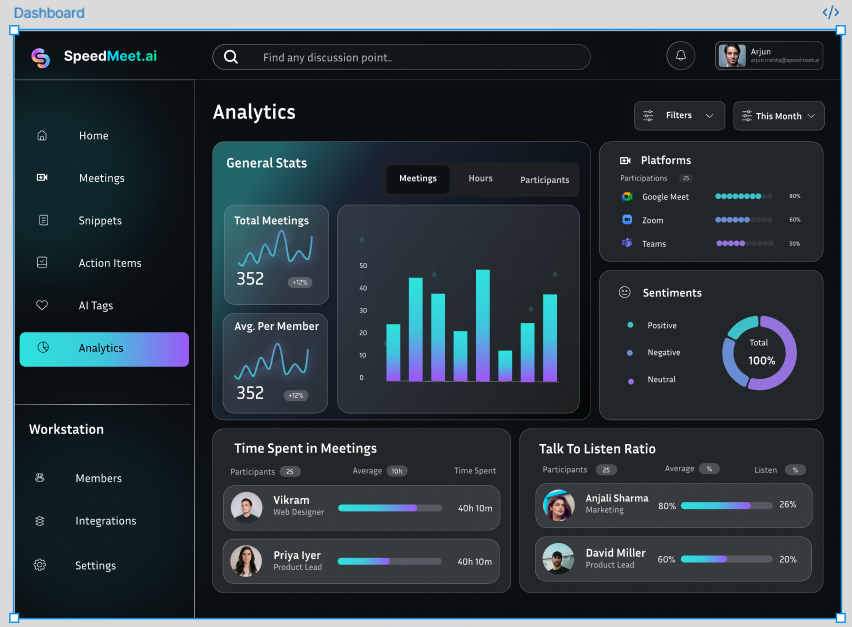
Design a dashboard for a user who needs to monitor activity and take action from one screen. The page should feel like a working control center, not a marketing overview. Start with a clear shell: top nav or sidebar, a page title, and a compact set of global controls such as date range, search, and filters.
Build the main area from 3–5 widgets with different jobs. Include at least one chart for trend, one KPI or summary card, one table or list for recent items, and one panel that supports a direct task such as approving, assigning, or resolving items. The layout should show what matters first, then let the user drill in without losing context.
Make hierarchy explicit with spacing, type scale, and contrast. The most important number or status should be readable in a glance. Secondary controls should stay nearby but quiet. If a widget can fail or have no data, show that state in place with a clear next step instead of a dead panel.
Adapt the layout across screen sizes. On smaller widths, stack the highest-priority widgets first and keep filters and actions reachable. The final UI should feel dense but controlled: enough information to manage the system, not so much that the screen turns into noise.
What to deliver
- Design a dashboard shell with persistent navigation and a clear primary content area
- Add 3–5 data widgets with distinct roles: trend, status, list, and action
- Include one primary management panel for filtering, sorting, or bulk actions
- Show loading, empty, and error states for at least one widget
- Design responsive behavior for desktop, tablet, and narrow widths
Aim for a balance between aesthetics and functionality, ensuring that the visual design enhances the dashboard's usability.