Gallery
See what others have created
sheeshable
@sheeshable
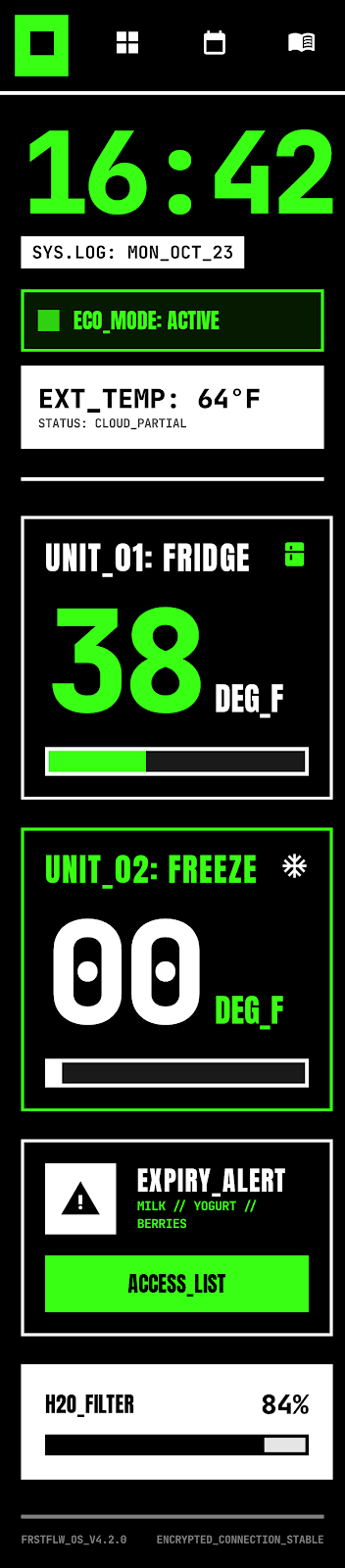
Fridge Control Interface
Design the main fridge control interface as the screen a user sees when they open the appliance app or tap the fridge display. Start with the information they need most: current temperatures for each compartment, door status, and any active alerts. The layout should make it obvious what is running, what is adjustable, and what needs attention.
Put the core controls on the home view. Fridge, freezer, and any specialty zones should be adjustable with clear increments and visible current values. Add modes such as vacation, quick chill, ice maker on/off, and humidity or preservation presets if the model supports them. Keep the control pattern consistent across zones so users do not have to relearn each setting.
Show the states that matter in real use: door open, temperature out of range, filter due, child lock enabled, and connectivity status. Each state should include a clear next step, not just an icon or warning. If the interface supports touchless gestures or physical buttons, map them to the same actions and feedback so the experience feels like one system.
What to deliver
- Design the fridge home screen with current temperatures, door status, and mode shortcuts.
- Add controls for fridge, freezer, and specialty zones with clear step sizes.
- Show food modes such as vacation, quick chill, and ice maker states.
- Include alerts for open door, temperature drift, and filter replacement.
- Design a settings path for Wi‑Fi, child lock, and unit preferences.
Incorporate an element of delight, like playful animations or personalized greetings, to enhance user engagement with everyday appliance use.