Gallery
See what others have created
sanika0_0
@sanika0_0
Help & Support
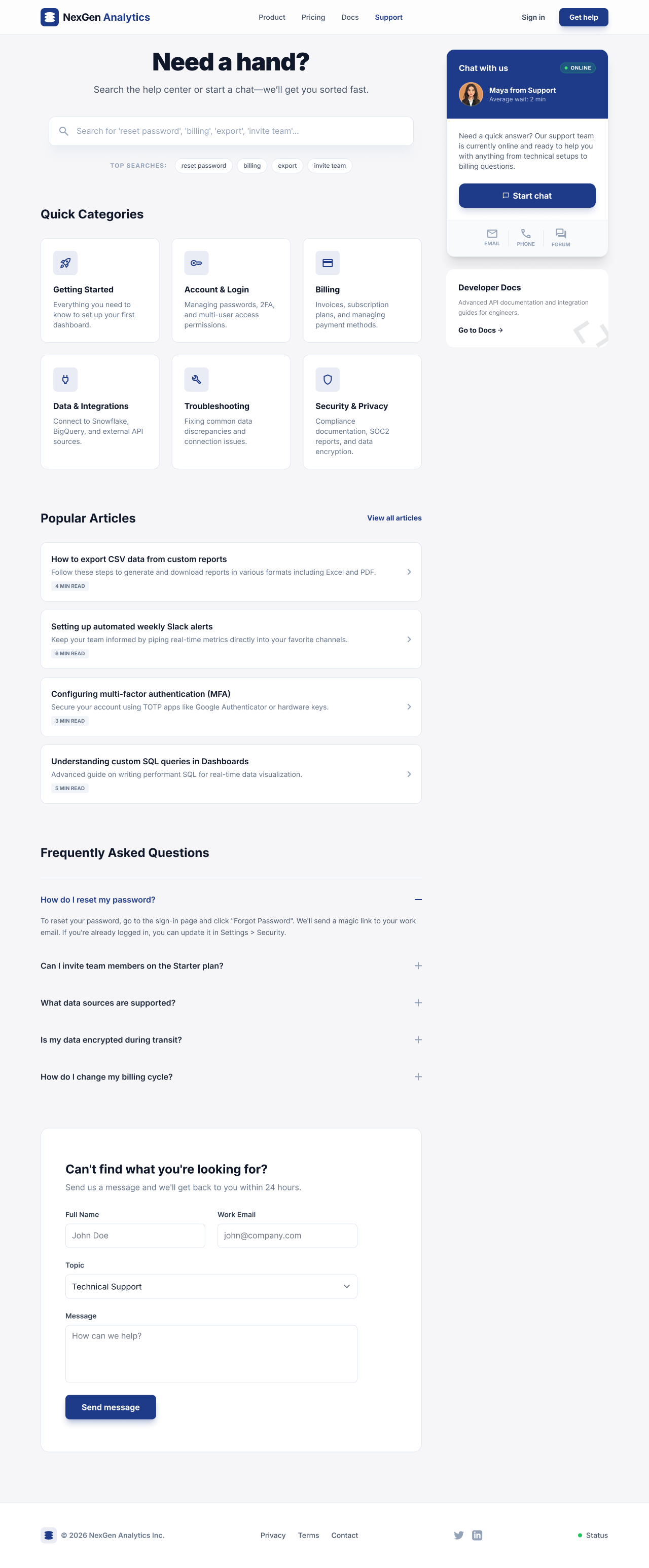
Design a Help & Support screen for a product where users arrive with a problem and need a fast next step. The page should open with a prominent search bar, then surface the most common issues as categories or shortcuts: billing, account access, setup, and troubleshooting.
Below that, show a FAQ area with expandable questions. Answers should be short, readable, and written in plain language. If a question needs escalation, the UI should point to the next action directly from the answer, not make the user hunt for contact info.
Include at least one clear contact path: email form, ticket submission, or live chat. If chat is available, show its status and expected wait. If it is offline, replace it with a useful fallback like callback, email, or help article suggestions.
Design the page so the hierarchy is obvious at a glance: search first, common issues second, contact options last. Add loading, empty, and no-results states that keep the user's query visible and offer a way forward.
What to deliver
- Design the support landing page with search, top categories, and contact options.
- Show a FAQ section with expandable questions and clear answer states.
- Design a contact path for email or form submission with required fields and validation.
- Include a live chat entry point with availability status and fallback if chat is offline.
- Add empty, loading, and no-results states for search and FAQs.
Inject personality into your Help & Support design by including friendly avatars or conversational copy that echoes the brand's voice.