Gallery
See what others have created
boldsyndication
@boldsyndication
Leaderboard
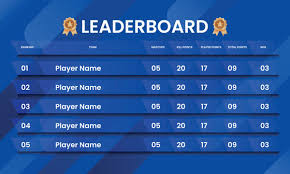
Design a leaderboard screen for a competitive product where users need to scan rank, score, and movement quickly. Start with a clear header: leaderboard title, active timeframe, and controls for sort, filter, and search if needed. The list should make the current ranking obvious at a glance, with the top three treated as a special group and the rest presented as a clean, ordered table or card list.
Each row should show the minimum data needed to understand position: rank, avatar or badge, name, score, and change since the last update. If the product supports categories, show the active segment directly in the UI so users know which leaderboard they are viewing. Keep the current user visible if they are not in the top ranks, and make the selected row or hovered row easy to inspect without losing the list context.
Use interaction for detail, not decoration. Hover, tap, or click can reveal extra stats such as streaks, wins, percentile, or recent activity, but the ranking itself should stay readable while those details are open. Include loading, empty, and no-results states that explain why the list is blank and offer a next step, such as changing filters or time range.
What to deliver
- Design the leaderboard header with title, timeframe, and sort/filter controls.
- Show the top ranks with distinct emphasis for 1st, 2nd, and 3rd place.
- Lay out the full ranked list with avatar, name, score, and rank change.
- Add row-level detail on hover or tap without breaking the list.
- Include empty, loading, and no-results states for filtered views.
Employ contrasting colors or typography to distinguish the top-ranking participants and create a sense of excitement and competition.