Gallery
See what others have created
digitalshape
@digitalshape
Home Automation Control Panel
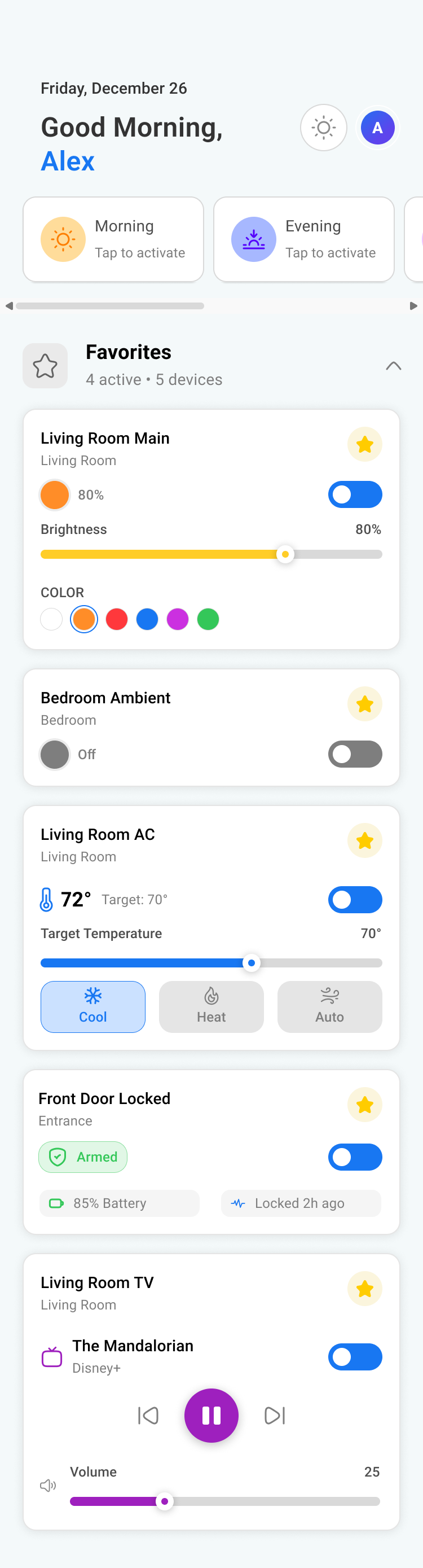
Design a home automation control panel that acts as the main command center for a connected home. Start with a dashboard that groups devices by room, then surface the most-used controls first: lights, temperature, security, and media. The screen should let someone understand what is on, what needs attention, and what can be changed in one pass.
Make the core controls fast and direct. Lights need brightness and color control. Climate needs current temperature, target temperature, and mode. Security needs arm/disarm status, sensor state, and camera access. Media needs play/pause and volume. Keep each control compact, but make the current value readable before interaction. Show feedback immediately when a setting changes, including motion, color, or state updates.
Add a shortcuts area for scenes and routines such as Good Morning, Away, or Movie Night. Let people pin favorite devices, rename rooms, and schedule repeated actions from the same pattern. Include clear states for offline devices, permission limits, and failed actions so the panel does not stop at the error. The result should feel like a living home map, not a grid of disconnected toggles.
What to deliver
- Design the main home control dashboard with room and device groups
- Create direct controls for lights, climate, security, and media
- Add a quick-actions area for scenes, favorites, and routines
- Show device detail states for on, off, active, offline, and adjusting
- Include scheduling and automation setup for repeated actions
Enhance the mockup with context-aware design elements, using light or dark modes depending on day and night to simulate real-world usage.